
How Long Does It Last?
MacBook Pro battery life is important for people who use their MacBook for work, study, business, travel or entertainment. Modern MacBook Pro models give battery performance but the real MacBook Pro battery life depends on the model, workload, screen brightness, applications, internet activity and overall battery condition.
Apple rates current MacBook Pro models for battery performance. For example the M5 MacBook Pro can give up to twenty‑four hours of video streaming and up to sixteen hours of web browsing under Apple’s testing conditions. However real‑world MacBook Pro battery life can vary because each user has applications, settings and workloads.
What Affects MacBook Pro Battery Life?
Several factors can affect MacBook Pro battery life. Screen brightness Wi‑Fi use, Bluetooth, video calls, background applications and demanding software can raise power consumption. Video editing, gaming, programming, graphic design and other intensive tasks usually use MacBook Pro battery life than web browsing or document editing.
Having many browser tabs open can also raise energy usage especially when websites contain videos, animations or other demanding content. Closing applications and tabs that are not needed can help MacBook Pro battery life.
Why Is My MacBook Pro Battery Draining Quickly?
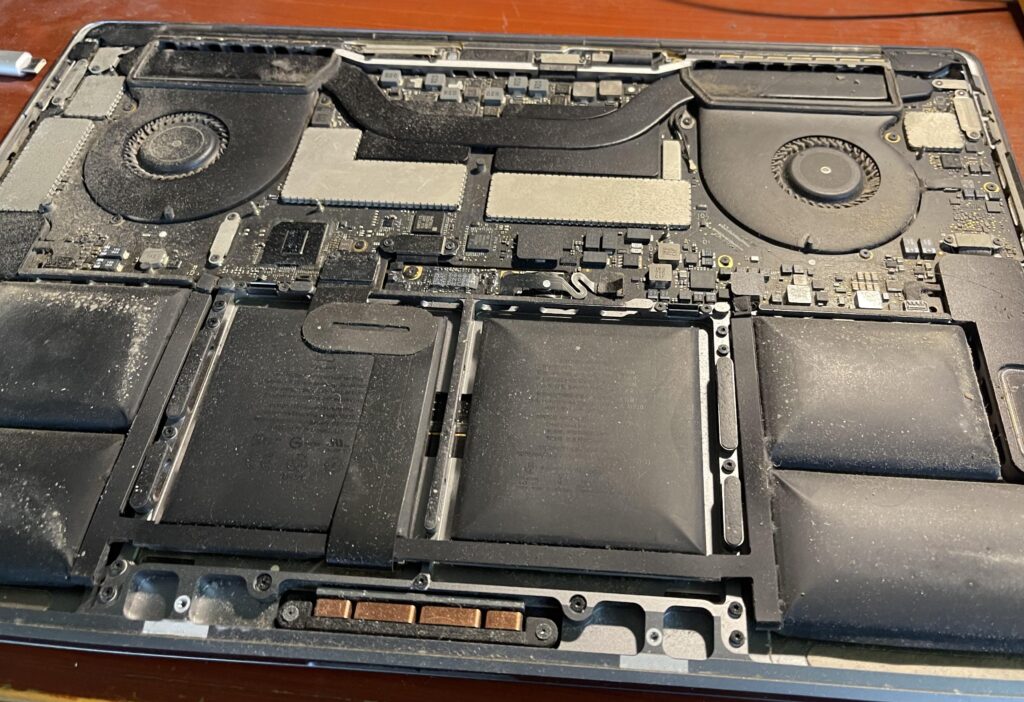
If your MacBook Pro battery is draining, check which applications are using energy. A demanding application or background process may be using power than expected.
Battery age is another factor. Lithium‑ion batteries naturally lose capacity as they age chemically. Charging habits, temperature and the number of completed battery cycles can affect long‑term MacBook Pro battery life.
A battery cycle means using one hundred percent of the battery’s capacity. It does not always mean charging from zero percent to one hundred percent in one session. Many MacBook Pro models have a cycle limit of one thousand though the exact limit depends on the model.
How to Check MacBook Pro Battery Health
You can check your MacBook battery condition through macOS. Open the Apple menu go to System Settings click Battery, Battery Health. Depending on your Mac and macOS version you may see information about MacBook Pro battery condition and maximum capacity.
You can also check the battery cycle count by holding the Option key clicking the Apple menu opening System Information and selecting Power. This information helps you see whether your MacBook Pro battery is aging or losing capacity.
How to Improve MacBook Pro Battery Life
changes can help improve MacBook Pro battery life. Reduce screen brightness when maximum brightness is not needed. Close applications. Avoid leaving demanding software running in the background.
Keep macOS up to date. Use Apple’s battery‑management features to support long‑term MacBook Pro battery life.
Avoid exposing your MacBook to heat because high temperatures can hurt lithium‑ion battery performance.
If your MacBook Pro no longer gives runtime for your daily needs consider replacing the MacBook Pro battery. Always check the model and battery part number before buying a replacement because different MacBook Pro generations use batteries.
Laptop O.T For Laptop Battery Solutions
Laptop O.T. Offers laptop battery products and battery‑focused information, for customers looking for replacement batteries. When searching for a MacBook battery or laptop battery always verify the model, voltage, capacity, connector and compatibility before ordering.
Conclusion:
MacBook battery life depends on your MacBook model, workload, settings and battery age. If your MacBook Pro battery performance has declined, checking battery health and cycle count can help find the cause. With battery care and the correct replacement battery when needed you can keep MacBook battery life high. Get more value from your MacBook Pro.
Follow Us:
Facebook: https://www.facebook.com/LaptopBatteryHub
Instagram: https://www.instagram.com/laptop_o.t/?hl=en
Google review: https://maps.app.goo.gl/M8nYVZPy6fEzRScc6
1. How long should a MacBook Pro battery last?

A MacBook Pro battery can provide several hours of use on a full charge, depending on the model, battery health, workload, and settings.
2. Why is my MacBook Pro battery draining so fast?
Fast battery drain can be caused by high-power applications, excessive brightness, background processes, an aging battery, or heavy workloads.
3. How do I check my MacBook Pro battery health?
Go to System Settings → Battery → Battery Health to check your MacBook Pro’s battery condition and maximum capacity.