
Introduction
Looking for Batteries Close to You is usually the first thing people do when their laptop stops holding a charge or turns off suddenly. Finding a store can save time but choosing the correct replacement battery is just as important as finding a convenient place to buy. You need to think about whether the battery fits, how good it is, how much it costs what kind of guarantee it has and how trustworthy the seller is before you buy.
Whether you use a Dell, HP, Lenovo, Acer, ASUS, Toshiba or another laptop brand the right battery can help get the power back and make daily work easier. This guide explains how to find laptop batteries compare stores and avoid common mistakes when buying. If you are shopping in Pakistan these helpful tips can help you make a choice.
What Does Batteries Close to You Mean?
The phrase batteries close to you helps people find battery stores, computer accessory shops and online suppliers near their location. However not every store that sells batteries has laptop batteries. Some focus on car batteries while others sell household batteries or other types of power products.
Because of that use a specific search like “laptop battery shop close to me” or “Dell laptop battery near me.” A direct search can help you find stores that have the right products for your device.
Benefits of Finding a Local Battery Store
A store might allow you to check if the battery is in stock ask questions and look at the replacement battery before buying. You can also compare prices. Ask about the warranty directly. However always call the store before going because online listings do not mean that a specific battery is available.
Types of Laptop Batteries That Are Available
Laptop batteries come in shapes, sizes, voltages and connector styles. Even laptops from the company may need different battery models. Choosing a battery just because it is the brand or looks similar can cause problems with fitting.
Dell, HP, Lenovo, Acer and ASUS Batteries
laptop brands have different battery designs across their models. A Dell Latitude battery for example may not work with a Dell Inspiron. Similarly two Lenovo ThinkPad laptops may need battery numbers.
Before buying check the model number of your laptop and the part number on the original battery if you can see it. Compare these details with the replacement product. If you are not sure ask the seller to make sure it works before you order.
How to Find Batteries Close to You
Finding a seller becomes easier when you use online research and talk directly to people. Start by finding out what battery you need then search for stores that specialize in laptop batteries of general electronics.
Search Google Maps
Google Maps can help you find stores see directions read reviews and find contact information. Google says that local search results depend partly on how relevant, how close and how well-known a businesss
Google Business Profile Help
So search using your battery type and your location then check if each business actually sells laptop batteries.Batteries Close to You
Compare Reviews and Prices
Read what customers say to understand how a seller handles product quality, delivery and returns. Compare prices after you know that the batteries have the same details. A low price may not Batteries Close to You be the best choice if the seller can’t explain how it works or what the warranty covers.
Ask if the battery is new or used how long the warranty is and what happens if it doesn’t fit your laptop. Clear answers can help you avoid costs.
How to Choose the Right Laptop Battery
The best replacement battery is one that fits your laptop and comes from a seller who gives information about the product. Before you pay check the model, the details and the return rules.
Check the Model and Part Number
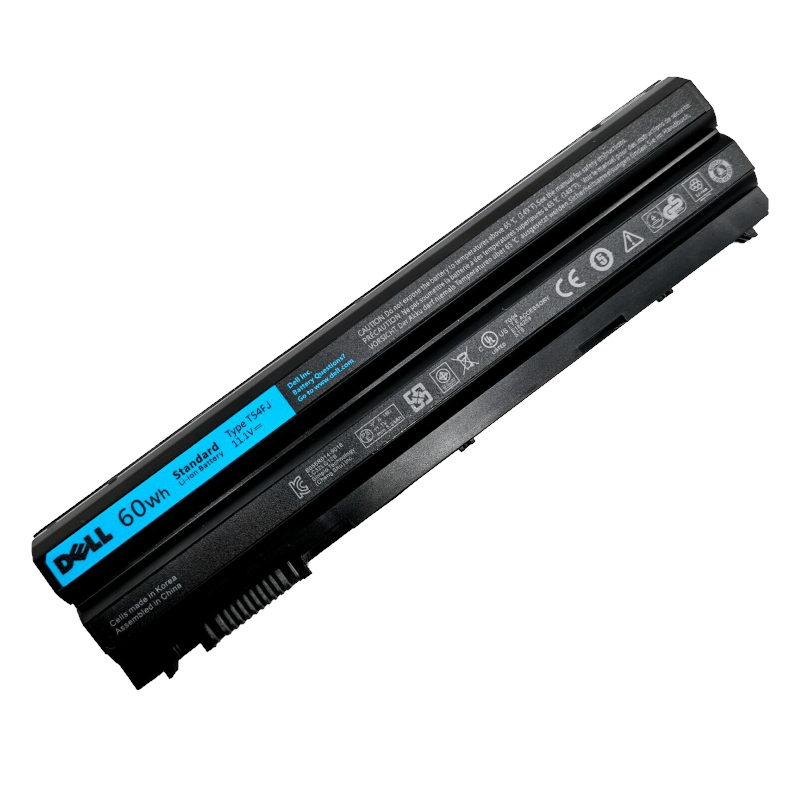
Find the model number of your laptop on the bottom in the system information or in the manufacturers papers. If the battery is easy to take out the label may show a part number and electrical details. For a battery that’s inside use the official service guide instead of opening the laptop without the right skills.
Matching the battery part number is important because similar laptop models can use batteries. When the information is not clear ask the seller to give written confirmation.
Compare Battery Details
Check the voltage how power it has, the size and how it connects. Power is often listed in watt-hours (Wh) or milliamp-hours (mAh). Don’t just pick a battery because it has a power number; it also has to fit what your laptop needs. Batteries Close to You
Check the warranty. What the battery is like. A good seller should explain the return or exchange rules clearly.
Signs That You Need a New Battery
A laptop battery might need to be replaced if the time it lasts is much shorter the charge percentage changes a lot. The laptop turns off quickly after you take it off the power. A message about battery health can also show that the power has gone down.
However problems with charging don’t always mean the battery is broken. A bad charger, a damaged charging port or a software issue can cause problems. Check the battery health and the charging equipment before you buy an one.
Safety warning: If your battery looks swollen or broken stop using the laptop and get help from a professional. Do not press, cut or try to take out a battery yourself. Dell says you should stop using it and not try to damage or remove a battery without the right help.
Dell Pakistan
Tips for Buying Batteries Online
Shopping online can help you compare laptop batteries when local stores don’t have enough. Before you order make sure you know the model and part number the condition of the battery the warranty, the delivery fee and the return rules. Check that the seller has contact information and a clear description of the product.
Keep your order confirmation and any written help about compatibility. When the battery comes check it for any damage before you put it in. If the battery looks swollen or broken do not put it in. Charge it.
For laptops that have batteries follow the manufacturers instructions or use a trained person if professional help is needed. Being careful is important because damaged lithium-ion batteries can be very dangerous.
Why Choose Laptop O.T.?
Laptop O.T. Focuses on laptop batteries helping people look for replacement options for models. If you are looking for batteries to you or comparing online sellers in Pakistan you can go to the Laptop O.T. Website and look at the products available.
Before you buy match the battery listed with your laptops model and part number. If you can’t find your battery contact the seller with your model details. Ask about compatibility, availability and warranty.Batteries Close to You
Choosing the seller is not just about finding the lowest price. Accurate details, support and a clear return policy can make buying Batteries Close to You easier and help you avoid getting the wrong battery.
Conclusion
Finding batteries close to you is easier when you know what to look for. Use searches, compare good stores and check your laptops model and battery part number before you buy. Think about the quality, the warranty and whether it works, not the price.
For laptop battery options check out Laptop O.T.. Compare the products with your laptops details. With a work and careful checking you can find a good replacement and go back to work with more confidence.
Follow Us:
Facebook : https://www.facebook.com/LaptopBatteryHub
Instagram : https://www.instagram.com/laptop_o.t/?hl=en
Google Review : https://maps.app.goo.gl/M8nYVZPy6fEzRScc6
How do I find laptop batteries close to me?
Search for “laptop battery shop to me” or your laptop brand and model. Read reviews call the seller and make sure the battery is available before you go.
How can I find the laptop battery?
Check the model number of your laptop and the part number on the original battery. Make sure it works with the seller before you order.
Are laptop batteries worth it?
Price by itself does not show quality. Compare details, warranty the condition of the battery and the seller’s reputation before you buy.
Can I buy laptop batteries online in Pakistan?
Yes. Make sure the seller can deliver to your area and gives details, about compatibility, warranty and returns.